FBTUG-帶起遠端連線環境
基本資料
時間:4/6
地點:遠端
活動內容
測試遠端連線環境
測試內容
- 遠端 SSH
pi@farmbot:~/farmbot/DevZone.git/trunk/firmware/verification $ python serial_script.txt
- 遠端 Camera
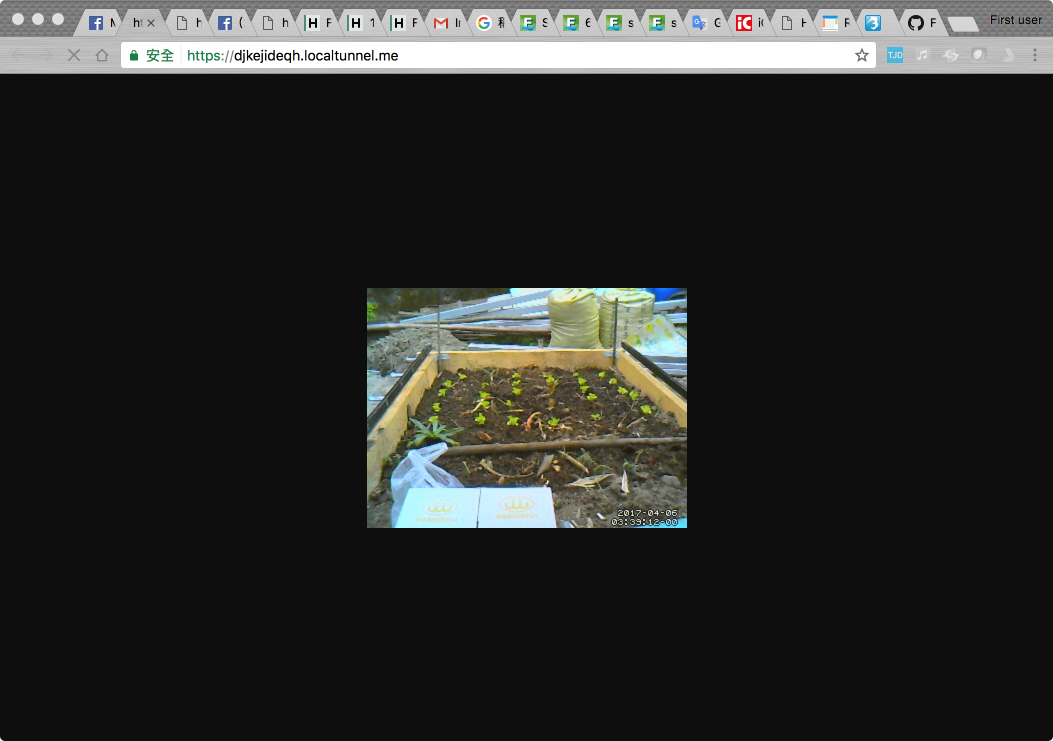
- python script 測試水閥開關
F41 P9 V1 M0 # water on
F41 P9 V0 M0 #water off
Local 環境
幸延 , RASPBIAN
遠端環境
哈爸, Mac
Issue
- 用 screen 還不會設定 local echo, 打進去也沒反應
- 用 minicom, 會設 local echo, 但是打進去還是沒反應
處理情形-minicom
安裝 minicom
- sudo apt-get install minicom
minicom 中,打命令,完時等約一秒鐘,不要按 enter, Arduino 就會正常執行那個命令
按 Enter 反而不會正常
原因是 Enter 會送 \r 進去,但需要送 \n 才能正常。
似乎用 stty 可以將模式改能正常,但是試不出來
一些參考命令與輸出如下:
第一次執行 sudo minicom -s
- 設定 /dev/ttyACM0 , 115200 N81, no hardware flow control
- save to dfl, 下次就不用設定
- 進入 minicom 請打 Ctrl-A, Z 會出現選單, 輸入 E 可以開啟 local echo
輸入 F83, 應可正常看到以下輸出
R00
F83R01
R83 GENESIS V.01.04
R02
R00
輸入 Ctrl-A, Q 離開
其他 Add linefeed, Add Carriage Ret 等,都嘗試過,不能成功
sudo stty -a -F /dev/ttyACM0
speed 115200 baud; rows 0; columns 0; line = 0;
intr = ^C; quit = ^\; erase = ^?; kill = ^U; eof = ^D; eol = <undef>; eol2 = <undef>; swtch = <undef>; start = ^Q; stop = ^S; susp = ^Z; rprnt = ^R; werase = ^W; lnext = ^V; flush = ^O; min = 1; time = 5;
-parenb -parodd -cmspar cs8 hupcl -cstopb cread clocal -crtscts
ignbrk -brkint -ignpar -parmrk -inpck -istrip -inlcr -igncr -icrnl -ixon -ixoff -iuclc -ixany -imaxbel -iutf8
-opost -olcuc -ocrnl -onlcr -onocr -onlret -ofill -ofdel nl0 cr0 tab0 bs0 vt0 ff0
-isig -icanon -iexten echo -echoe -echok -echonl -noflsh -xcase -tostop -echoprt -echoctl -echoke
sudo stty -F /dev/ttyACM0 icrnl
查詢輸入時到底打什麼字進去
pi@raspberrypi:~ $ ps -aux | grep minicom
root 2512 0.1 0.3 6780 3180 pts/0 S+ 11:31 0:00 sudo minicom -o
root 2516 0.1 0.6 7956 5968 pts/0 S+ 11:31 0:00 minicom -o
pi 2519 0.0 0.2 4276 2012 pts/3 S+ 11:31 0:00 grep --color=auto minicom
pi@raspberrypi:~ $ sudo strace -p 2516
Process 2516 attached
select(4, [0 3], NULL, NULL, {0, 856089}) = 1 (in [3], left {0, 0})
read(3, "R00", 127) = 3
write(1, "R00", 3) = 3
ioctl(3, TIOCMGET, [TIOCM_DTR|TIOCM_RTS|TIOCM_CTS]) = 0
gettimeofday({1491564713, 951921}, NULL) = 0
ioctl(3, SNDCTL_TMR_TIMEBASE or SNDRV_TIMER_IOCTL_NEXT_DEVICE or TCGETS, {B115200 -opost -isig -icanon -echo ...}) = 0
select(4, [0 3], NULL, NULL, {1, 0}) = 1 (in [3], left {0, 996687})
read(3, "\r\r\n", 127) = 3
write(1, "\r\n\n\n", 4) = 4
ioctl(3, TIOCMGET, [TIOCM_DTR|TIOCM_RTS|TIOCM_CTS]) = 0
gettimeofday({1491564713, 955703}, NULL) = 0
ioctl(3, SNDCTL_TMR_TIMEBASE or SNDRV_TIMER_IOCTL_NEXT_DEVICE or TCGETS, {B115200 -opost -isig -icanon -echo ...}) = 0
select(4, [0 3], NULL, NULL, {1, 0}) = 1 (in [0], left {0, 616239})
read(0, "F", 32) = 1
write(3, "F", 1) = 1
ioctl(3, TIOCMGET, [TIOCM_DTR|TIOCM_RTS|TIOCM_CTS]) = 0
gettimeofday({1491564717, 344244}, NULL) = 0
ioctl(3, SNDCTL_TMR_TIMEBASE or SNDRV_TIMER_IOCTL_NEXT_DEVICE or TCGETS, {B115200 -opost -isig -icanon -echo ...}) = 0
select(4, [0 3], NULL, NULL, {1, 0}) = 1 (in [0], left {0, 704370})
read(0, "8", 32) = 1
write(3, "8", 1) = 1
ioctl(3, TIOCMGET, [TIOCM_DTR|TIOCM_RTS|TIOCM_CTS]) = 0
gettimeofday({1491564717, 640528}, NULL) = 0
ioctl(3, SNDCTL_TMR_TIMEBASE or SNDRV_TIMER_IOCTL_NEXT_DEVICE or TCGETS, {B115200 -opost -isig -icanon -echo ...}) = 0
select(4, [0 3], NULL, NULL, {1, 0}) = 1 (in [0], left {0, 728875})
read(0, "3", 32) = 1
write(3, "3", 1) = 1
ioctl(3, TIOCMGET, [TIOCM_DTR|TIOCM_RTS|TIOCM_CTS]) = 0
gettimeofday({1491564717, 912355}, NULL) = 0
ioctl(3, SNDCTL_TMR_TIMEBASE or SNDRV_TIMER_IOCTL_NEXT_DEVICE or TCGETS, {B115200 -opost -isig -icanon -echo ...}) = 0
select(4, [0 3], NULL, NULL, {1, 0}) = 1 (in [0], left {0, 800622})
read(0, "\r", 32) = 1
write(3, "\r", 1) = 1
ioctl(3, TIOCMGET, [TIOCM_DTR|TIOCM_RTS|TIOCM_CTS]) = 0
gettimeofday({1491564718, 112413}, NULL) = 0
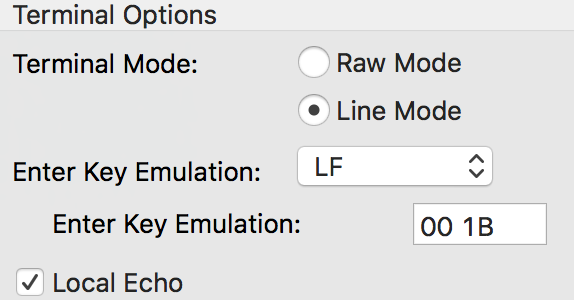
Mac CoolTerm 參考
處理情形 - screen
安裝 screen
- sudo apt-get install screen
直接打 命令,不下 Enter, 能正常工作
Issue
- 經過 code trace, 還是不能理解在 minicom 中,為何不用輸入 Enter,下的命令可以正確被執行