研究筆記 - PLEN2
Introduction
- 20公分高的開源迷你機器人PLEN2,跳舞、踢球都難不倒它
- Plen2 KickStarter
- Video1 - PLEN2, the world’s first printable open-source humanoid
Youtube
FabCafe workshop
- 和核心團隊成員認識
- 親自用手機控制 PLEN
- 組裝提供的手臂(上了兩個馬達)
- 使用 Web 版的 Motion Editor 控制剛組好的手臂
- Arduino 上傳簡單的驗證 code, 讓手臂動作
- 討論如何用 Arduino 就可以控制 24 Serves (一般無法控制那麼多)
Top Level Architecture Diagram
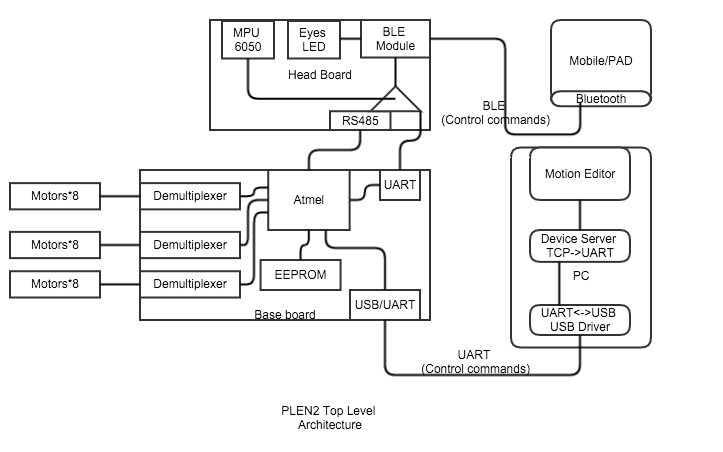
Github structure
- repositories
- General
- Hardware
- Firmware
- Mechanical
- Software
- Motion installer
- Motion Editor
- plen__motion_editor_for_web
- plen__motion_editor_for_Unity
- 預設動作
- plen2/motion/*.json
- Config utility
- Control server
- Mobile software
- Verification
Robot architecture
- Mechnical
- Serve
- 工作電壓:4.5〜6V,電流消耗:空載300毫安失速時600毫安,驅動扭矩:1.6kgf厘米(在5V)
- 速度:0.125sec / 60°(在5V),齒輪:塑膠,電機:Koado直流電機,旋轉角度:160度(A型)140度(B型)
- 脈衝寬度:500〜2100uS(A型)750〜1850uS(B型)的中心位置1300uS * 1,
- 尺寸:23.8x11.8x20.8毫米,重量:9克,線路類型:橙色:信號,紅色:電源+,茶:GND
- * 1:由於我請注意不像一個典型的RC伺服的中心位置(往往是脈衝寬度1500uS =中心位置)。
- ES08-MD[ http://www.amazon.com/dp/B00EDGMRDU ] is available in many countries and has almost the same dimensions.
Top Level Block Diagram
Firmware architecture
firmware.ino
- setup()
- joint_ctrl.loadSettings();
- loop()
- if (motion_ctrl.playing())
- {
- if (motion_ctrl.frameUpdatable())
- {
- motion_ctrl.frameUpdate();
- }
- if (motion_ctrl.frameUpdateFinished())
- {
- if (motion_ctrl.nextFrameLoadable())
- {
- motion_ctrl.loadNextFrame();
- if ( (motion_ctrl.playing() == false)
- && interpreter.ready() )
- {
- interpreter.popCode();
- }
- }
- else
- {
- motion_ctrl.stop();
- if (interpreter.ready())
- {
- interpreter.popCode();
- }
- }
- }
- }
- if (system.USBSerial().available())
- {
- app_ctrl.readByte(system.USBSerial().read());
- if (app_ctrl.accept())
- {
- app_ctrl.transition();
- }
- }
- if (system.BLESerial().available())
- {
- app_ctrl.readByte(system.BLESerial().read());
- if (app_ctrl.accept())
- {
- app_ctrl.transition();
- }
- }
- soul.logging();
- soul.action();
- }
AccelerationGyroSensor : AccelerationGyroSensor management
ExternalEEPROM : external EEPROM management
Interpreter : MotionController interpreter
JointController : JointController.h
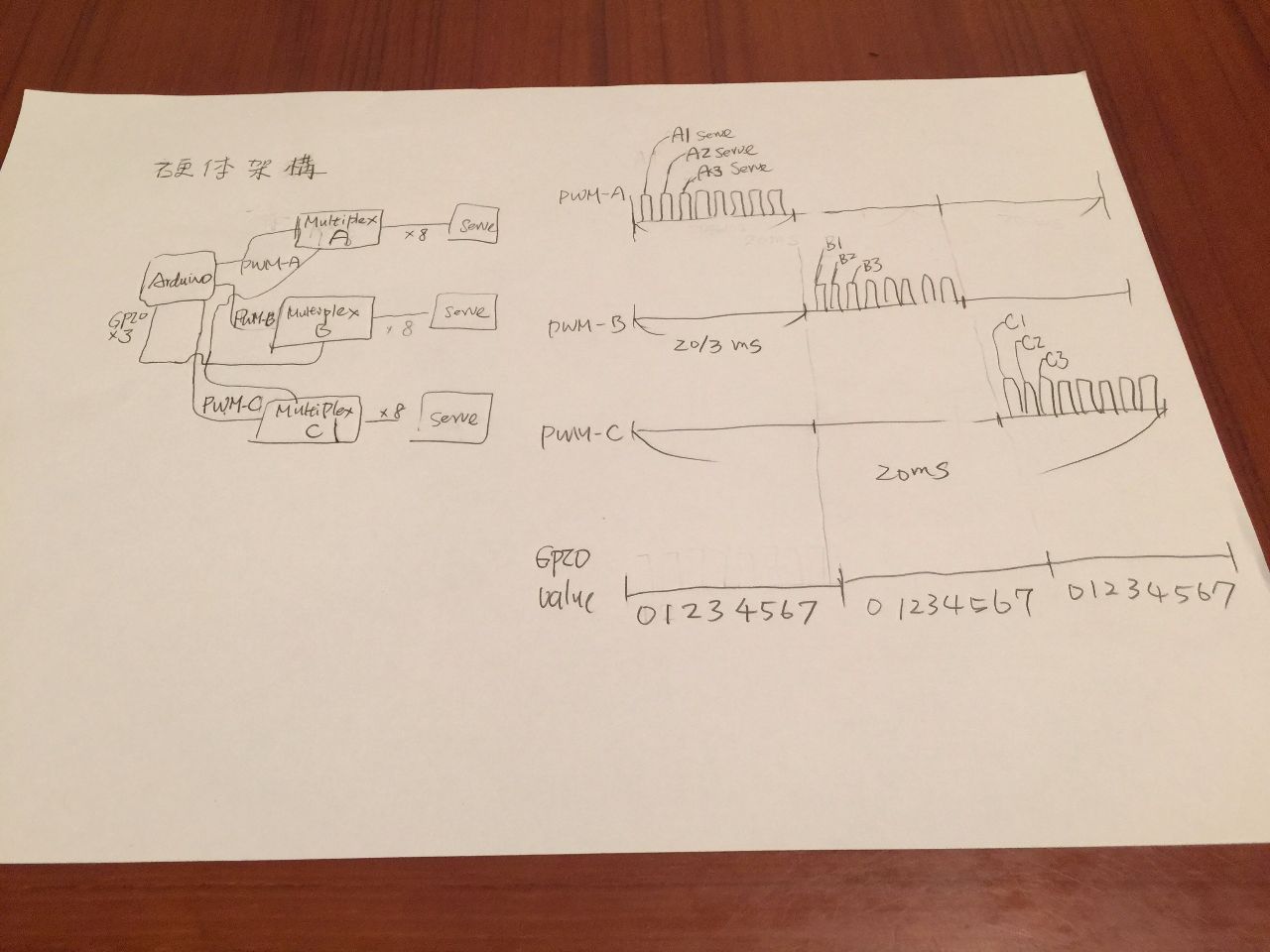
- use 3 hardware pwm to control 24 serve
- calculate join angel and pwm value
pinMode(Pin::MULTIPLEXER_SELECT0(), OUTPUT);
pinMode(Pin::MULTIPLEXER_SELECT1(), OUTPUT);
pinMode(Pin::MULTIPLEXER_SELECT2(), OUTPUT);
pinMode(Pin::PWM_OUT_00_07(), OUTPUT);
pinMode(Pin::PWM_OUT_08_15(), OUTPUT);
pinMode(Pin::PWM_OUT_16_23(), OUTPUT);
namespace Pin
{
inline static const int MULTIPLEXER_SELECT0() { return 5; }
inline static const int MULTIPLEXER_SELECT1() { return 6; }
inline static const int MULTIPLEXER_SELECT2() { return 12; }
inline static const int PWM_OUT_00_07() { return 11; }
inline static const int PWM_OUT_08_15() { return 10; }
inline static const int PWM_OUT_16_23() { return 9; }
inline static const int RS485_TXD() { return 4; }
inline static const int LED_OUT() { return 13; }
inline static const int RANDOM_DEVCIE_IN() { return 6; }
}
inline static const int MULTIPLEXER_SELECT0() { return 5; }
inline static const int MULTIPLEXER_SELECT1() { return 6; }
inline static const int MULTIPLEXER_SELECT2() { return 12; }
LoadSetting
TCCR1A =
_BV(WGM11) | _BV(WGM10) | // 10bit高速PWM動作に設定
_BV(COM1A1) | _BV(COM1A0) | // 比較一致でOC1AをHIGHレベルに出力
_BV(COM1B1) | _BV(COM1B0) | // 比較一致でOC1BをHIGHレベルに出力
_BV(COM1C1) | _BV(COM1C0); // 比較一致でOC1CをHIGHレベルに出力
TCCR1B =
_BV(WGM12) | // 10bit高速PWM動作に設定
_BV(CS11) | _BV(CS10); // 前置分周64に設定
TIFR1 = _BV(OCF1A) | _BV(OCF1B) | _BV(OCF1C) | _BV(TOV1); // 割り込みフラグをクリア
/*
Execution timing is when TCNT1 overflows.
In the case of PLEN2, and multiplying the periphery 64 minutes to 16 [MHz], and because it uses a counter 10bit,
(16,000,000 / (64 * 1024)) ^ - 1 * 1,000 = 4.096 it will be interrupted every [msec].
This value of 4.096 [msec] is, to the PWM signal permissible input interval of the servo motor
It is a sufficiently small value. Therefore, once every interruption 8 times for each servo motor
Enter the PWM signal, by switching the output destination of the servomotor for each interrupt,
We have realized the control of a plurality of servo motors.
attention
Variable to be changed internally, it is safe to basically put a volatile qualifier.
By optimization of the compiler, you can prevent a confusing bug.
Since the output of the PWM signal is controlled by a double buffered by the AVR microcontroller,
The output value of the PWM signal you need to look ahead one than the referenced joint value.
Failure to this operation, since the plurality of servo motor control to an unintended behavior,
Please pay attention.
*/
ISR(TIMER1_OVF_vect)
MotionController : MotionController
Pin.h : pin setup
Purser : parser?
PurserCombinator : command combine
Soul : top level motion ( ex: face down )
System : system parameter, (ex: version, baudrate )
Reference
研究 Motion Editor 控制 Controller 的架構
Study firmware
- UART 命令與解析在 PurserCombinator
Study how EEPROM be used
- MotionController::setHeader, setFrame
- exteeprom.writeSlot
- Wire.beginTransmission(slave_address);
- Wire.write((byte)(data_address >> 8)); // High側アドレスを指定
- Wire.write((byte)(data_address & 0x00ff)); // Low側アドレスを指定
- for (int index = 0; index < write_size; index++)
- {
- Wire.write(data[index]);
- }
- int ret = Wire.endTransmission();
- MotionController::play, loadNextFrame, dump
- MotionController::getHeader
- exteeprom.readSlot
- Wire.beginTransmission(slave_address);
- Wire.write((byte)(data_address >> 8)); // High側アドレスを指定
- Wire.write((byte)(data_address & 0x00ff)); // Low側アドレスを指定
- int ret = Wire.endTransmission();
- if (ret == 0)
- {
- ret = Wire.requestFrom(slave_address, read_size);
- if (ret == read_size)
- {
- for (int index = 0; index < read_size; index++)
- {
- data[index] = Wire.read();
- }
- }
- ....
- }
Study control server
- python code 來根據 usb/bt 連上 device, 使用 Python web framework 來跟 browser 溝通(開啟 local port)
- python code
- 關節代號在 device_map.json
- Command line 參數在 server.py
- Bottle: Python Web Framework
- server.py
- from bottle import Bottle
- server = Bottle()
- def main(args):
- json.load(device_map.json)
- if usb -> driver = USBDriver.Core(DEVICE_MAP)
- server.run(host = 'localhost', port = args.port)
- driver/usb/core.py
- def connect(self):
- 找一些預定的 /dev/xxx, 然後連上
- def install(self, json): => 似乎只有安裝 frames
- 命令格式
Study motion json file
"codes": [],
"frames": [
*{
"outputs": [
{
"device": "left_shoulder_pitch",
"value": 0
},
{
"device": "left_thigh_yaw",
"value": 0
},
]
"transition_time_ms": 100
- }
"name": "Pass to Left",
"slot": 26
Questions
Q1 : How to use hardware PWM*3 + GPIO*3 control 24 serves?
Q2 : ASV-15 跟 SG-90 有何不同?
Q3 : 如何買?
A3 : ASV-15 ES08MDII